Attaching a sticky (fixed) header/footer to an Android ListView
In my Android app, I have a ListView, and I want to persist a button at the bottom of the page (like how the Gmail app has Archive, Delete, and Older on the View Email screen). Unfortunately, this is not trivial, and many others have tried, but despite those suggestions, I never found something that quite worked correctly. The third article above got me actually pretty close, so without further ado, here's a working solution (images and javascript include after the jump):
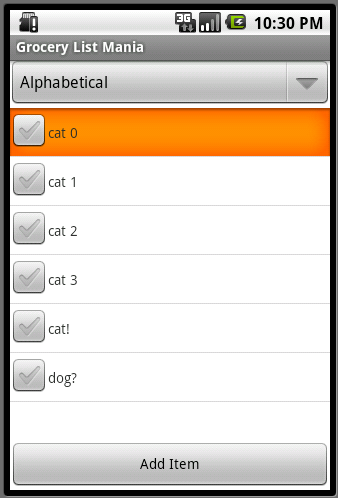
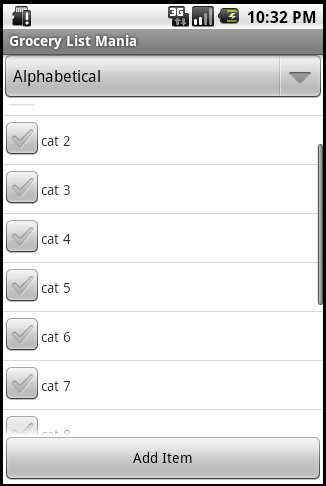
(you'll probably want to view that XML at gist by hitting the gistfile1.xml or view raw links)
This creates a view with a header bar (for sorting), a list view, and a footer bar (for common tasks). When the list view has enough items to warrant scrolling, the list rows do NOT bleed "through" the footer, and when the list is short the footer does not rise up.
Initial setup: there's the root element, a relative layout. There's a relative layout inside that with id top_control_bar, which is the header. Then there's a linear layout with the footer, id bottom_control_bar. Finally there's the list view for when there's content, and the text view for when there's no content.
So some things to notice:
- The outermost element is a RelativeLayout. This is essential, so you can position the inner elements relative to each other.
- The footer has the
android:layout_alignParentBottom="true"attribute. This is required to make it stick to the bottom. - Suprisingly, the header and footer both have to show up above the listview in the xml tree. This is so that the listview can reference the ids of the header and footer for positioning. I presume this is because the XML parser resolves IDs in a single pass.
- The ListView has
android:layout_below="@id/top_control_bar" android:layout_above="@id/bottom_control_bar"so that it will always be below the top bar and above the bottom bar.
Definitely spent a couple hours figuring this one out, so I hope this helps!
p.s. I only tested this out with the Android 2.1 emulator...hopefully it works for others as well.
EDIT 4/22/2011: One of the commenters kindly provided the Java equivalent of this, click here to jump to it.